
A year at a glance calendar for teachers
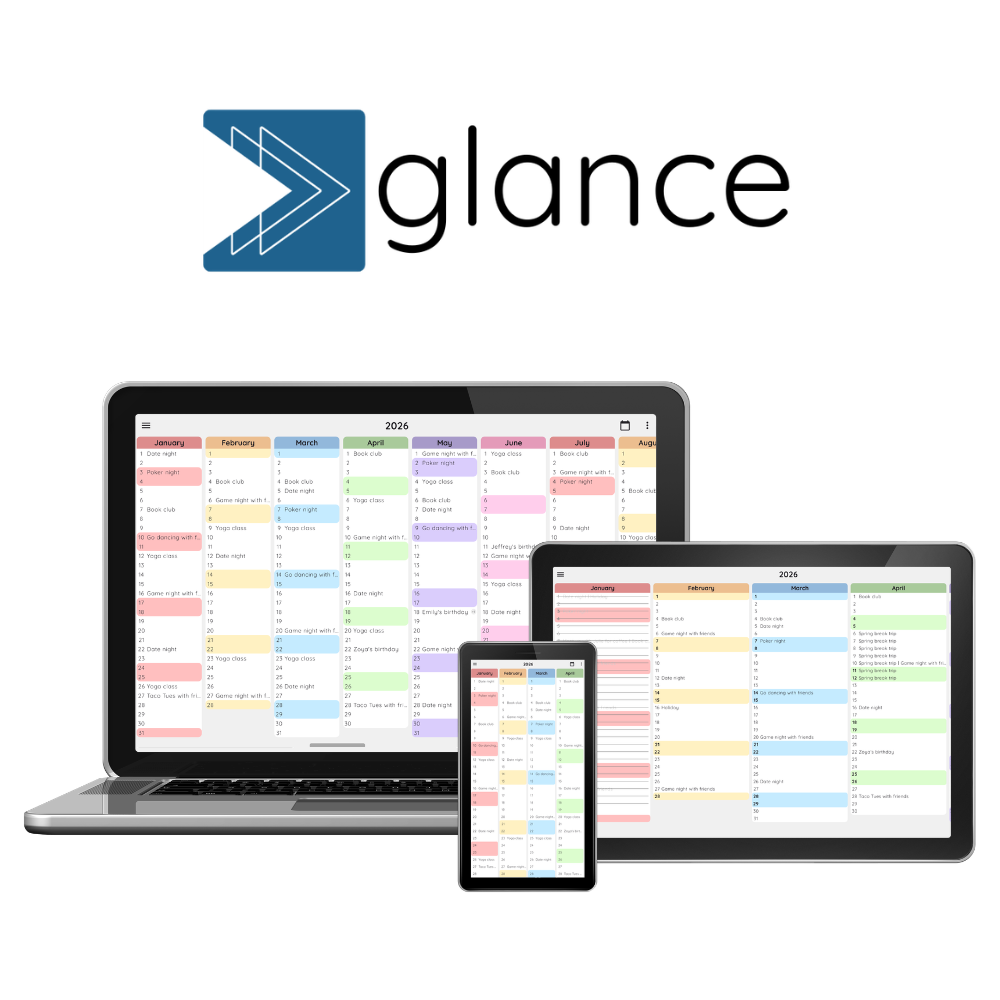
Plan the school year and get a handle on your schedule before it gets busy. See your teaching commitments, important dates, busy periods and time off across the entire year.


Why teachers need a year at a glance calendar
A normal calendar is great when you need to know what’s happening tomorrow or next week, but teaching often requires more visibility and intentional planning of the quarter and year: semesters and terms, holidays, exams, grading periods, projects, school events and everything in between. That’s where a year at a glance calendar can help. You can step back and easily see how everything fits together across the year.
With your full year in clear view, you can spot busy periods before they arrive, see how much teaching time you actually have, and plan larger projects around holidays, exams and other interruptions. You can also see your work commitments alongside your personal plans, making it easier to understand when your schedule is getting full and where you have room to breathe.
Key benefits

See the shape of your school year
See your holidays, exams, projects, meetings and other commitments together, so you can understand how the entire school year fits together.
Spot busy periods before they arrive
See when exams, grading, meetings and school events start piling up, giving you time to plan ahead instead of discovering a busy week when it’s already here.

Make room for life outside school
Keep your personal plans visible alongside your teaching schedule, so you can see when work is taking over your calendar and where you have time for yourself.
How teachers can use a year at a glance calendar
A year at a glance calendar can be useful whether you’re teaching only one class or juggling several subjects, classes and academic commitments. The details will look different depending on your role, but the goal is the same: get enough perspective on the year to plan ahead without having to try to keep the next six months in your head.

Elementary school teachers
When you’re responsible for one main class, your year often revolves around a mix of curriculum milestones, school events and activities involving your students and their families. Use a year at a glance calendar to map out holidays, school trips, parent-teacher conferences, assessment periods, classroom projects and other important dates. Seeing these alongside your curriculum plans can help you spread larger projects throughout the year and avoid accidentally stacking too much into the same period.
Middle & high school teachers
When you’re teaching several classes or subjects, it can be harder to keep track of how different assessments, projects and deadlines overlap. A year view gives you a way to see major milestones across your classes at the same time. Mark out exams, research projects, grading periods, parent conferences, school events and other fixed commitments to see where your schedule is likely to get busiest. You can then plan larger assignments and assessments around holidays, school trips and other interruptions rather than trying to work everything out one month at a time.


College & university professors
For professors, the academic year has its own rhythm of semesters, teaching periods, exams, grading and breaks, often alongside research, conferences and other professional commitments. A year at a glance calendar can help you see these different responsibilities together. Map out semester dates, major assessments, grading deadlines, office hours, conferences and academic breaks to get a clearer picture of your workload throughout the year and identify periods when you may want to protect your time for research, travel or other commitments.
How to plan your school year with a year at a glance calendar
You don’t need to build another planning system from scratch. If you already use Google Calendar, you can connect it to Glance in under a minute and see your existing schedule across the entire year. From there, organize your events in a way that makes it easy to focus on exactly what you need to see.
Step 1: Connect Google Calendar
Start with the Google account you already use. Connect Google Calendar to Glance so your existing events appear in your year at a glance view without having to recreate your schedule somewhere else. Explore our quick start guide for more guidance.
Step 2: Decide how to organize your calendars
Before adding everything to your year view, think about how you’d like to organize your events. Do you want to see all types of events together? Will you ever want to view events from only one type of event, for example, just one class? Could it be helpful at some point to only see exams and projects? Your personal plans?
Google Calendar lets you create separate calendars for different types of events, and Glance lets you toggle those calendars on and off independently in year and day views. The best setup depends on how you teach and your personal preferences.
If you teach several classes or subjects, you might create one calendar for each class. Put everything related to that class in the same calendar, including lessons, exams, projects and other important dates. When you’re planning for one class, you can then turn off the other calendars and focus on just that class. Depending on the rules at your school, you could even decide to share these specific calendars with students or parents so they have visibility into these major milestones, too.
If you teach fewer classes or have one main class, it may make more sense to organize calendars by type of event. For example, you could have separate calendars for exams, projects, school events and other important dates. Or you could simply leave all school-related events in one calendar category, and then your personal events in another.
There’s no single right way to organize it. The important thing is to choose categories that make it easy to switch between the big picture and the specific view you need.
Step 3: Add your school’s important dates
Map out the fixed dates that shape the school year. These might include:
- First and last day of school
- Holidays and school breaks
- Professional development days
- Teacher workdays
- Exam or testing periods
- Grading and report-card deadlines
- Parent-teacher conferences
- School trips and major events
Once these dates are visible across the year, you can start to see the natural rhythm of the school year and the periods when your available teaching time is more limited.
Step 4: Add your recurring teaching & personal commitments
Next, you can decide whether to add the regular commitments that affect how your weeks are structured, such as recurring classes, department meetings, staff meetings and other regular obligations. We’d recommend added these types of events to their own calendar category (for example, called “Recurring”) so that you can easily toggle them off in the year view and only see them in the day view. This way your year view stays focused on only major events but you never lose availability as you look at your schedule.
Step 5: Step back and look at the whole year
Now comes the part that a traditional calendar doesn’t make particularly easy: step back and look at everything together. Start with all of your calendars visible, then toggle different categories on and off in the year view depending on what you’re planning. We recommend keeping all calendars “on” in the day view.
Looking at one class? Hide everything else. Planning your exam schedule? Show your exam calendar alongside your school dates. Planning your next vacation? Turn on your personal calendar and see what your work schedule looks like around it.
Then ask yourself:
- Where are my busiest periods?
- Where do exams, grading and major projects cluster?
- Where could I realistically plan a trip or time off?
You don’t need to predict everything that will happen over the next year. The point is to understand the shape of the year well enough to make better decisions about what’s ahead and protect what’s important.
Join 1,000+ people planning with Glance
Ready to see your school year differently?
Pricing
Glance is currently free while we continue building the product. We will soon introduce optional paid features and plans, while keeping a useful free version available. If you'd like to support development in the meantime, you can buy us a coffee.

FAQs
We’d love to hear from you! Whether it’s a question, feedback, or just to say hi, fill out the form or send us a note at team@getglance.io.
For tips on planning smarter, sign up to our newsletter here.